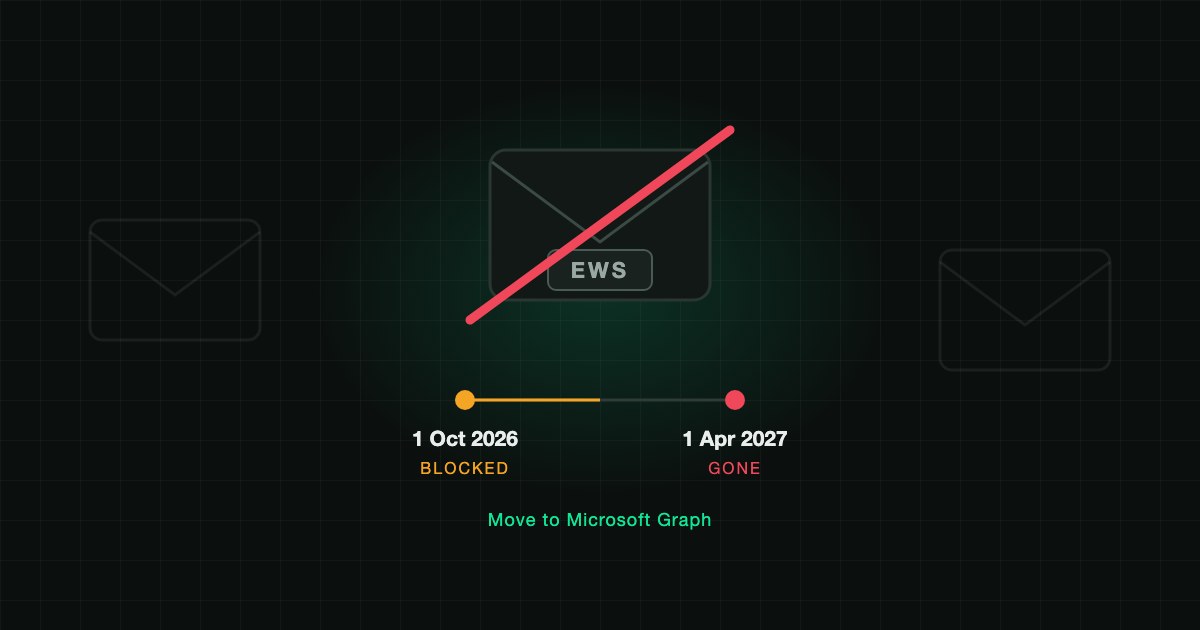
Microsoft started disabling Exchange Web Services (EWS) in Exchange Online on 1 October 2026. Tenants that did nothing have EWS turned off. Tenants that set EWSEnabled to true and listed their apps in the EWSAllowedAppIDs allow list keep working until 1 April 2027, when EWS is removed permanently with no way to turn it back on. Anything that still reads mail, calendars or contacts through EWS has to move to Microsoft Graph before then.
Exchange Server on-premises is not affected. This is Exchange Online only.
What is the EWS retirement timeline?
| Date | What happens |
|---|---|
| 1 October 2026 | Enforcement begins. Without an allow list, Microsoft sets EWSEnabled to false and EWS calls fail. |
| Until 1 April 2027 | Tenants with EWSEnabled true and a configured EWSAllowedAppIDs list keep EWS for the listed apps only. |
| 1 April 2027 | EWS is permanently disabled in Exchange Online. No re-enablement. |
One detail catches people out: EWSEnabled set to true with no allow list is not an exemption. Microsoft's message center notice (MC1447678) states that in that state all EWS traffic is blocked except cross-tenant organization relationships.
Sources: Microsoft Learn, Deprecation of EWS in Exchange Online, message center posts MC1227454 and MC1447678.
What typically breaks?
The usual suspects in a mid-sized Microsoft 365 tenant:
- Backup and archiving tools that export mailboxes
- CRM and ticketing plugins that log email or sync calendars
- Room booking, signage and scheduling systems
- Mail migration tools and older journaling integrations
- In-house scripts and line-of-business apps written years ago
If a user says "the calendar sync stopped this month", check EWS first.
How do I find every app still using EWS?
Use two lists, because permission is not the same as usage.
1. Actual traffic. In the Microsoft 365 admin center, open Reports, Usage, Exchange Online, EWS usage. It shows the App ID of every caller, the SOAP operations it runs and its call volume. Export it.
2. Standing access. Apps can hold EWS rights without calling them this week. List them with Microsoft Graph PowerShell:
$exo = Get-MgServicePrincipal -Filter "appId eq '00000002-0000-0ff1-ce00-000000000000'"

# Application permission: full_access_as_app (every mailbox, no user present)
Get-MgServicePrincipalAppRoleAssignedTo -ServicePrincipalId $exo.Id -All |
  Where-Object AppRoleId -eq 'dc890d15-9560-4a4c-9b7f-a736ec74ec40' |
  Select-Object PrincipalDisplayName, PrincipalId

# Delegated permission: EWS.AccessAsUser.All
Get-MgOauth2PermissionGrant -All |
  Where-Object { $_.ResourceId -eq $exo.Id -and $_.Scope -match 'EWS.AccessAsUser.All' } |
  Select-Object ClientId, ConsentType, PrincipalId
An app that appears in list 2 but not in list 1 is the best kind of finding: remove its permission today and nothing breaks.
How do I keep a critical app working until April 2027?
Add only the App IDs you have confirmed in the usage report, then turn EWS on:
Set-OrganizationConfig -EwsEnabled $true -EwsAllowedAppIDs "<appId-1>,<appId-2>"
Get-OrganizationConfig -RetrieveEwsOperationAccessPolicy | Format-List EwsAllowedAppIDs
Setting the list replaces it, so always pass the full set. Changes can take up to 24 hours. Include any Microsoft first-party app that still appears in your usage report. Treat the list as a bridge with an end date, not a fix.
Why is this a security issue, not just a migration?
EWS with full_access_as_app can read every mailbox in the tenant without a signed-in user. Microsoft named EWS in the Midnight Blizzard intrusion of January 2024 and widened the retirement to its own products as a result. An old OAuth app with that permission is exactly the kind of quiet, standing access attackers look for, the same pattern behind service principal sprawl.
The retirement is a once-in-a-decade chance to close it. When you move an app to Graph, grant the narrowest permission that works, and scope application access to the mailboxes it needs instead of the whole tenant.
How SecValley helps
A one-time export tells you what is true today. SecValley's Microsoft 365 scanner reviews application permissions on every scan, including high-risk mailbox and Exchange permissions, so an app that quietly regains broad mail access shows up as a dated finding rather than a surprise.
Frequently Asked Questions
When does EWS stop working in Exchange Online?
Enforcement began on 1 October 2026. Tenants without an allow list lost EWS then. Tenants with EWSEnabled true and an EWSAllowedAppIDs list keep it for the listed apps until 1 April 2027, when EWS is disabled permanently.
Does the EWS retirement affect Exchange Server on-premises?
No. The retirement applies to Exchange Online only. Exchange Server is not affected.
Is setting EWSEnabled to true enough to keep EWS?
No. With EWSEnabled true and no allow list, Microsoft blocks all EWS traffic except cross-tenant organization relationships. You need both settings.
What replaces EWS?
Microsoft Graph. Microsoft publishes a mapping from EWS operations to Graph APIs, and a small set of gaps (archive and public folder import and export, among others) is on its roadmap. Check the Microsoft Learn deprecation page for the current list before you plan around a missing feature.
How do I see which apps use EWS?
The EWS usage report in the Microsoft 365 admin center (Reports, Usage, Exchange Online, EWS usage) shows each caller's App ID and call volume. Pair it with a permission inventory, because an app can hold EWS access without using it.
Can we get an extension past April 2027?
No. Microsoft has stated that after 1 April 2027 EWS is permanently removed with no re-enablement.